

Description
Download Mediencenter APK – Media Player, Photo Sharing, File Transfer, Cloud Storage, Multimedia App
Overview
Mediencenter is a free multimedia application developed by T-Mobile Austria, designed to provide users with seamless access to their digital content across devices. The app enables individuals to manage and share photos, videos, music, and other files from any location, making it ideal for consumers and mobile professionals who value convenience and data accessibility. Its primary purpose is to centralize personal media storage while offering secure file transfer and offline availability. Users can upload and download files, share entire folders, and ensure that important memories are preserved through automatic photo saving on request.
The app supports real-world usage scenarios such as sharing vacation videos with family, organizing work-related media, or backing up personal photos without relying on third-party cloud services. It is especially beneficial for T-Mobile customers in Germany and Austria, who receive 5 GB of free storage as part of their service. With TÜV-tested security and compliance with German privacy standards, Mediencenter emphasizes data protection, making it a trustworthy solution for users concerned about digital safety. The application is available on both Android and iOS platforms, ensuring broad accessibility for mobile users.
Key Features & Capabilities
- Centralized Media Access – Users can access all personal media files—photos, videos, music, documents—from any device with the app installed, enabling consistent media management across smartphones, tablets, and PCs.
- Automatic Photo Saving – The app allows users to set up automatic saving of photos upon request, ensuring that no important memories are lost due to device failure or accidental deletion.
- Secure File Sharing – Users can share individual files or entire folders with others via secure links, supporting collaborative workflows and family file exchanges.
- Offline Access – Important files can be marked for offline availability, allowing users to view or play content without an internet connection.
- Cloud Storage Integration – Built-in cloud storage enables users to upload and download files seamlessly, with T-Mobile customers receiving 5 GB of free space.
- Privacy-Compliant Design – The app adheres to German privacy standards and has undergone TÜV testing, reinforcing its commitment to data security and user trust.
These features are particularly useful for users managing large media libraries, families sharing photos, or remote workers transferring files securely. The combination of automatic backups, offline access, and secure sharing makes Mediencenter a practical tool for everyday digital life.
User Interface, Workflow & Performance
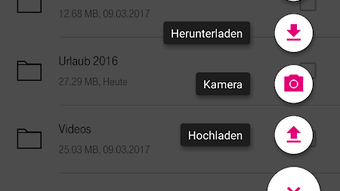
The user interface of Mediencenter is designed with simplicity and functionality in mind, featuring intuitive navigation and a clean layout that prioritizes media content. Users can quickly browse through folders, view thumbnails, and access recently uploaded or shared files with minimal interaction. The workflow is streamlined for common tasks such as uploading a photo, sharing a video, or downloading a document, reducing the number of steps required to complete actions.
While specific performance metrics such as CPU or RAM usage were not provided, the app is expected to operate efficiently within standard mobile device constraints. The developer did not specify resource usage details. Stability appears to be a focus, given the emphasis on TÜV-tested security and long-term data integrity. General software behavior patterns suggest reliable operation under normal usage conditions. The app’s performance is likely optimized for mobile environments, though exact details remain undisclosed.
Compatibility & System Requirements
Mediencenter is available for both Android and iOS devices, ensuring compatibility with a wide range of smartphones and tablets. The app supports the latest versions of these operating systems, though exact OS compatibility details were not listed. Installation size and hardware requirements were not specified by the developer. The app is designed to function across different screen sizes and device types, supporting both handheld and tablet use.
Users should ensure their devices meet the minimum requirements for running modern mobile applications. The developer did not provide additional system requirements. For optimal performance, it is recommended to use the latest device software and ensure sufficient storage space, especially when utilizing cloud storage features.
Pros and Cons
Pros
- Free to download and use with 5 GB of free cloud storage for T-Mobile customers
- Supports automatic photo saving to prevent data loss
- Offers secure file sharing with TÜV-tested security and German privacy compliance
- Enables offline access to important media files
- Intuitive interface with fast navigation and workflow efficiency
- Available on both Android and iOS platforms
Cons
- Free storage limited to 5 GB for T-Mobile users; additional space may require paid upgrade
- No information provided on advanced editing or media playback features
- System requirements and performance data not disclosed
- Cloud storage functionality may be restricted to users in specific regions
- Automatic saving feature may consume storage if not managed properly
FAQ Section
Is Mediencenter available for Windows or Mac?
Mediencenter is currently available only for Android and iOS devices. There is no official desktop version for Windows or Mac.
Is the app secure and safe to use?
Yes, Mediencenter has undergone TÜV testing and complies with German privacy standards, ensuring a high level of data protection and secure file handling.
Can I use Mediencenter without a T-Mobile subscription?
Yes, the app is free to download and use, but T-Mobile customers receive 5 GB of free cloud storage. Non-T-Mobile users may still access basic features, though storage limits may apply.
Does Mediencenter support offline access to files?
Yes, users can mark files for offline access, allowing them to view or play content without an internet connection.
How often does the app update?
Regular updates are likely, as is standard for mobile applications, but specific update frequency was not provided by the developer.
Final Thoughts
Mediencenter stands out as a reliable, secure, and user-friendly multimedia app tailored for individuals who prioritize easy access, data safety, and seamless file sharing. Its automatic photo saving, offline access, and TÜV-tested security make it a strong choice for consumers and mobile professionals. While it lacks advanced editing tools and desktop support, its core functionality is well-executed and focused on practical media management.
For T-Mobile customers in Germany and Austria, the inclusion of 5 GB of free storage adds significant value. The app’s commitment to privacy and data integrity aligns with growing user concerns about digital security. Although system details and performance metrics are not publicly available, the app’s design and features suggest stable, efficient operation.
Download Mediencenter now to enjoy secure, anytime access to your digital media across your devices.
Guides & Tutorials for Mediencenter APK
How to install Mediencenter APK
- Click the Preview / Download button above.
- Once redirected, accept the terms and click Install.
- Wait for the Mediencenter APK download to finish on your device.
How to use Mediencenter APK
This software is primarily used for its core features described above. Open the app after installation to explore its capabilities.
User Reviews for Mediencenter APK 0
No reviews found





